Introduction
Chrome Debugging Protocol ( or CDP ) has complete access to almost everything the browser can see and can do. That make it an interesting target for Offensive Cyber operation.
Abusing CDP is not new, stealers do that all the time by spawning new browser process with --remote-debugging-port .
Why are we after CDP ?. Because browsers are information goldmines. Session tokens, saved passwords, autofill data, browsing history - it’s all there.
The problem is the behavior of restarting browsers and spawning new one with --remote-deubugging-port almost guarantee to be flagged by most AV and EDR vendors.
With that knowledge in mind, we can shift from spawning new process with suspicious params to find a way to enable the debugging port option from within running remote process browser
Enabling the debugging protocol in memory
The goal of this blog post won’t be about how to enable this in memory, as it has been documented carefully by @DeathFlamingo CDP-Enabler .
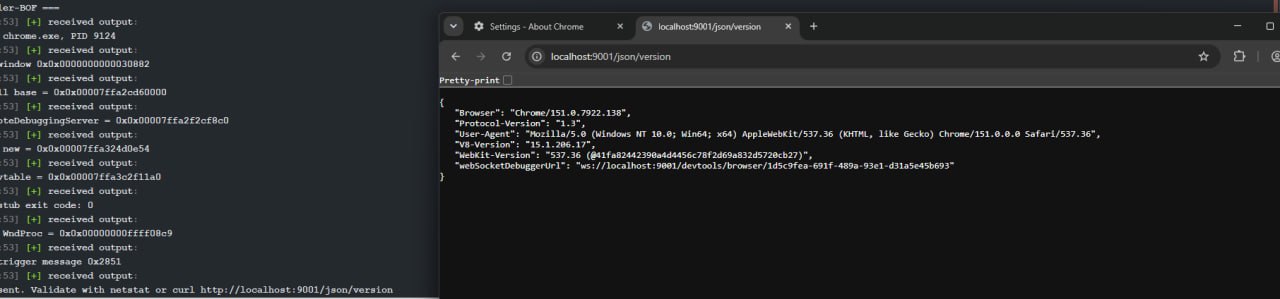
The only work need to be done is to keep it updated with chrome version 150+. In order to complete that task, I use IDA with IDA MCP Server, download the chrome.dll and chrome.pdb.
Tasked the LLM agents to find the vtable pointers and the correct RVAs for chrome version 150++.
After couple of trials and errors, this is the result we get:
Red team applications
1. Data extractions
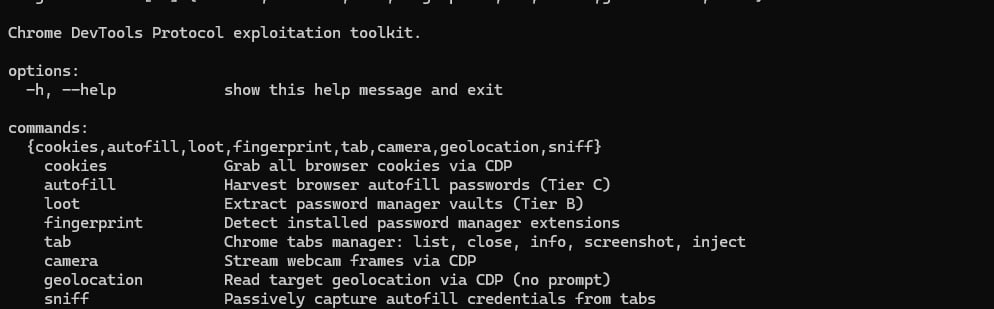
To sum up, all of the data we can extract includes:
- Cookies
- Saved password ( trigger autofill by placing autofocus / keymouse event )
- Browsing histories
- Bookmarks
- Extensions
- Tabs
Below are some of the examples
Cookies

We can extract all cookies, including HttpOnly and Secure flags
Tab, extensions management
We can:
- List opening tabs
1 | uv run python -m cdp_session tab list --host 127.0.0.1 --port 9001 |
- Take a screenshot of a tab (
cdp.call("Page.captureScreenshot", {"format": "png"})
1 | > uv run python -m cdp_session tab screenshot --target-id 110F3C9B86CB1FA3177698902B44FDE7 --host localhost --port 9001 -o .\abc.png |
- Inject javascript into running tabs
Fingerprint installed extensions and extract from password managers

Based on known extension ids on Chrome extension store, we can reliably identify which password managers, which extensions were installed
We can also identify if the password extension is currently locked ( unavailable for autofill )
When the password manager extension is unlocked i.e decrypted. All of the raw passwords are available to be extracted

Autofill raw password extraction
1 | uv run python -m cdp_session autofill --host localhost --port 9001 --foreground |
Autofill in browser does not work if the tab is in background in my case ( let me know if you can find a way ) and if the tab does not have any input. So we have to:
- Bring tab to the front
- Focus / dispatch input
It’s a little bit noisy, but I haven’t found any other way to trigger autofill from browser.
2. Taking screenshots and live cam
The live camera features is not ideal for Red teaming objectives because you cannot remove the red-dot which make it not an OPSEC choice.
We can take screenshot of a whole desktop ( not just tab ) by using chrome://feedback/ .
3. Networking as the victim
We can basically “Burp-ify” victim’s browser by placing us as a Proxy in the middle, we can route all networks in browser’s victim to our port back to our server. However it would requires sleep time for implant to 0 ~ interactive.
We can:
- Intercept requests
- Change responses/Change requests
- Add tracking headers
- Internal networking browsing
- … You named it
In my opinion, the most impactful thing you can have here is browse as the victim capability. Imagine just open your browser as the victim. Have all there saved cookies/credentials with no need for any 2FAs or passwords. ;)
Like a CursedChrome style
Conclusion
CDP is a powerful tool for post-exploitation. By enabling CDP from within running chrome processes, we can do a lot of offensive tasks and behave like a normal user behavior.
The source code is still in development, so it won’t be available. But I hope I can make it available on Github soon
Until next time :)