Introduction
The topic of Window NT File System ( NTFS ) is not new in the DFIR world, the ability to directly parsing on-disk structures of a mounted NTFS volume holds a lot of power and can definitely be interesting for both Offensive side and Defensive side. And it also a fun project to research to understand more about Windows ecosystem.
In this blog, we going to find out more about how a file presents on Windows system, a lifecycle of a file and more…
This blog post is not meant to introduce any new concepts or techniques, things written below are well covered by the community probably 10 years ago. But on the Offensive side, I don’t see much article or blog post about it. That’s why I’m writing this to hopefully revive its amazing capabilities.
NTFS and MFT overview
For more information, you can refer to this excellent documentation: NTFS Overview - NTFS.com
The NTFS file system views each file (or folder) as a set of file attributes. Elements such as the file’s name, its security information, and even its data, are all file attributes. Each attribute is identified by an attribute type code and, optionally, an attribute name.
When a file’s attributes can fit within the MFT file record, they are called resident attributes. For example, information such as filename and time stamp are always included in the MFT file record.
The TLDR version of it is NTFS file system contains:
$MFT: Master File Table basically a database contain a lot of FILE_RECORD$Boot: Boot sector$I30: Virtual presentation of$INDEX_ROOT, $INDEX_LOCATION, $Bitmap- At a higher level look:
$I30contains information about files and directories that are stored at a particular directory. - Timestamp, file_name, file_size for example
- At a higher level look:
How does a file stored in $MFT table.
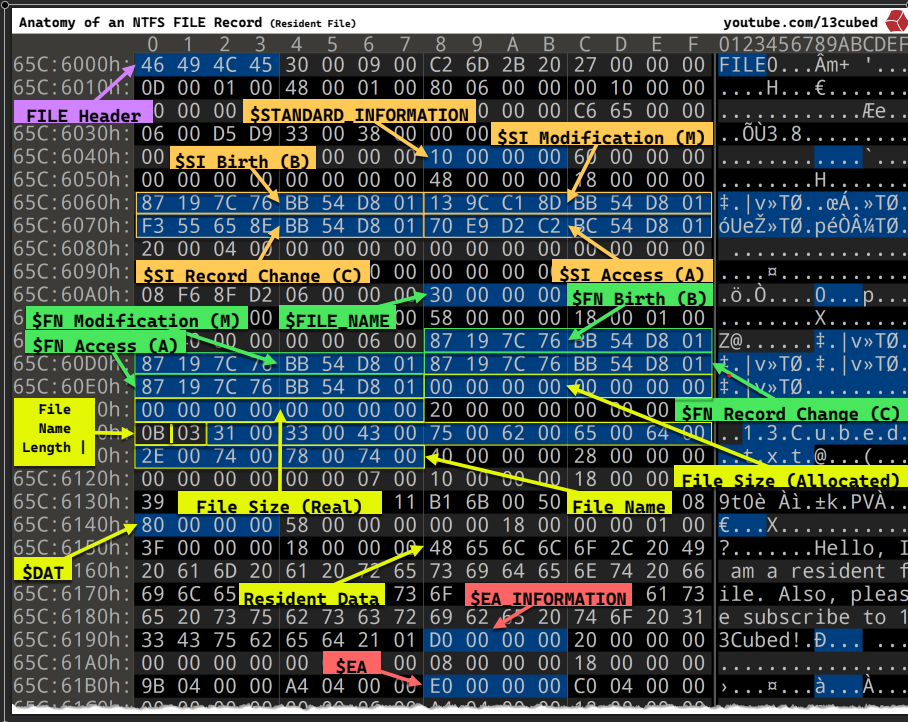
There are a lot of information within that picture, for the purpose of this blog post. We don’t need to dive in detail of every single field, but it also worth to highlight some of them that I think it is informative and also relate to what we are doing in this blog post:
$STANDARD_INFORMATION ( MACB timestamp )
Including 4 timestamps that stored in it, Windows API uses them to present the LastAccess, WriteAccess and CreationTime for users:
( M ) $SI Modification, ( A ) $SI Access, ( B ) $FN Birth( C ) $SI Record change: not exposed to Windows API
$FILE_NAME ( this one also stored its all set of MACB timestamp )
This one also stored another set of MACB timestamp, so for one file there are 2 different set of MACB timestamp
This one however is not exposed via Windows API, only modifiable via Windows Kernel ( but that doesn’t mean they cannot be manipulated in a malicious way ).
Timestomping
Threat Actor like to timestomping a file to make a file more blends in to the system, make it look like it has been on the system for years ( like in case of DLL Side loading, you would want the DLL to match the timestamp of the main executable file that you are going to sideload )
Threat hunter or blue teamer are often know 2 methods that to detect timestomping techniques
- Compare M vs B ( Modification vs Birth ) in
$STANDARD_INFORMATIONto the one in$FILE_NAME=> If different , file has been stomped - Compare to the nanoseconds (
.0000000)
The idea is legitimate because the $FILE_NAME record and its MAC( B ) timpestamp does not exposed via Windows API, only modifiable in Windows kernel
But in reality, Threat actor ( or Red teamer ) can find a way to get around it by:
- Timestomping the file to the nanoseconds precision i.e
timestompcommand in cobalt ( At this stage$STANDARD_INFORMATIONis modified, but$FILE_NAMEremain the same ) - Move the file to a temp directory or just rename ( at this stage,
$FILE_NAMEtimestamps has been changed to the timestomped information in$STANDARD_INFORMATION) - The threat actors at this point just need to timestomp the MFT change time and then you have a perfect set of timestamps ( It’s not as easy as it sounds ).
This works because when you move or rename a file, Windows copies the $STANDARD_INFORMATION timestamps into the $FILE_NAME attributes
For comprehensive analysis of timestomping, Forensic analysists will need to look to $USN Journal file system.
Life cycle of a file
For a normal delete operation in Windows, the file simply moved to Recycle Bin ( you can restore it in an easy way )
So what happened if you shift - delete a file in Windows ?.
From a $MFT point of view, a deleted file in Windows simply is just marked as isInUsed or not
1 |
|
So from FILE_RECORD header
1 |
|
When parsing the MFT entry , we can identify which file is shift-deleted:
1 |
|
So does it mean we can reliabily recover a shift-deleted file in Windows ? Well, Yes and no
As most of the “valuable” file we would want to recover for either Red teaming purpose or Forensic purpose will be a non-resident file, within the $MFT FILE_RECORD, a mark “notInUse= TRUE” is updated. So the data content is not totally erased, at least not yet, as long as the Clusters contains data for that file has not been overridden by other files, you can have a chance to successfully “recover” the file.
$I30 index attribute will be updated as the content of the directory has been changed , $USnJournal will be updated as well to reflect the changes of the file system
One of another advance technique to ‘recover’ the file is File Carving, in this case the FILE_RECORD is completely gone ( its name, MACB, size, location … ). So this case we have a free-floating file in various clusters in unallocated space. As long as those clusters in the $Bitmap are marked for notInUse = TRUE , but not overriden yet. The File Carving can go through those clusters and look for Known Type of file in the FILE_HEADERS ( magic bytes, signatures, … ) to look for indications what kind of file is this, and then after that as long as the data is stored continuously in the clusters, i.e not fragmented , then it is possible to recover such a file, only the content though because the FILE_RECORD is completely gone ( filename, location, macb timestamp, … ) ( Digital Picture and File Recovery
MFT Parsing
In order to discover deleted file, one has to parse the MFT entry
For any given files, there are 2 states: Resident and Non-resident file
- Resident: a file with a very small size ( around 600 bytes ) , so small that the content of the file can fit itself in
$MFTFILE_RECORDattribute - Non-resident: A typical file on Windows system, it will have one or more
Data Runsinside of it to help track where to find thatClusterof that file on disk. A cluster size is usually around 4KB ( 4096 )
The first 4-bytes of a “regular” MFT-entry (or record) starts with the signature “FILE”. The MFT entry can also be filled with 0-byte values, indicating it is empty (or unused )
To reconstruct the file system typically a $MFT parser has to:
- Determine the size of a MFT entry.
- Check if the MFT entry contains information it can extract, typically by checking for the “FILE” signature.
- Apply the fix-up values ( if needed ).
- Extract relevant information from the NTFS attribute, such as name of the file, MACB or MACE timestamps [1].
A high level overview and pseodu code will look like this ( There are already a lot of resource on how to parse MFT file Tutorial/Parsing the MFT | Handmade Network , you can reference from this blog.) . This is my own implementation based on the research of blogs that I attach in references
1 |
|
Fetch data of file based on MFT parsing
As mentioned in the Lifecycle of a file section, file data is stored on disk clusters ( outside the MFT )
We will talk more in depth about clusters:
- A cluster is the smallest unit of disk allocation in NTFS (often 4KB or 8KB)
- Files are stored in clusters, not individual bytes
The problem with file content parsing is fragmentation. A file might not me stored in consecutive clusters. So the file system has to has someway to remember:
- Where each cluster is physically located on disk
- In what order to read them
1 |
|
MFT Entry contains a map ( DataRuns ) pointing to where the data is on disk ( which offset ) and it’s solving the fragmentation problem
1 |
|
High-level overview of fetching file data content by parsing MFT entry:
- Parse
DataRun- Read the
DatarRunheader from MFT Entry - Convert it to a
DataRunarray withVCNandLCNandclusterCount
- Read the
- For each
DataRun:- Calculates physical byte offset:
LCN × bytesPerCluster(uint64_t runDiskOffset = run->startLCN * bytesPerCluster;)
- Calculates physical byte offset:
- Read from disk (
volumeReader.ReadData(buffer.data(), diskOffset, toRead);- Reads data directly from that physical location
- Write in order to
- Reads runs in VCN order (0, 1, 2…)
- Writes them sequentially to reconstruct the file
This works for both normal file and shift-deleted file.
Use case
Parsing MFT and reading file content by this method can serve many different purposes for both blue team and red team.
Being able to recover deleted file by parsing MFT combines with USN Journal can help the investigators diving deeper into a Windows machine they are investigate for more evidence
As for Offensive side and Red teaming, some of the benefits are:
- Search entire disks for file and its data content, including deleted ones.
- Retrieve file contents without opening an OS-level file handle, enabling access to data that is typically locked by the operating system
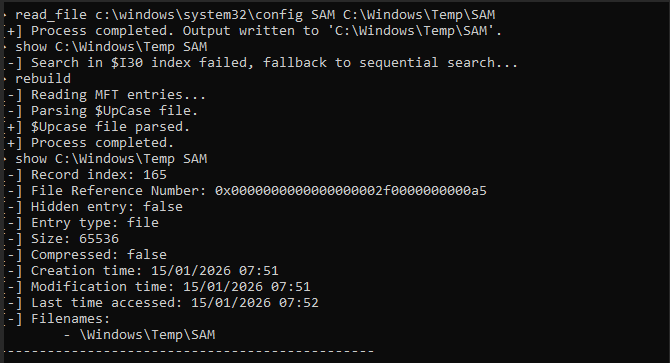
Example of failing to extract SAM database:

As you can see, SAM file is being held by SYSTEM process,
Using MFTTool ( GitHub - Kudaes/MFTool: Direct access to NTFS volumes )
Wrapping up
NTFS and MFT parsing have been used for a long time in Foresic & defensive world. I’d love to see more usages of it in an offensive way.
Maybe a post-ex module allows you to extract SAM database without touching registries and opening handles ?
Maybe a BOF module about MFT parsing for Cobalt or any other C2 ?. This’d be hard, but not impossible. Especially in the “everything is AI” generation .