Introduction
Early-bird injection used to be every malware author’s favorite technique to bypass Windows defender ( a long time ago tho xd ). It’s probably one of the first thing I learn when it comes to shellcode injection in malware development.
One of the key part of Early-bird injection technique is the usage of QueueUserApc function in Windows. But I never go deeper to understand how APC works internally at kernel level and what’s behind the theory
So in this blog post, we going to the journey of where does the thread go when we queueing it to the APC. I hope it’s fun for all of my readers and somewhat informative to you guys.
APC - Asynchronous Procedure Calls
I will not go into the definition of what is a APC call and how to use this function, that will be left for readers to go to Microsoft documentation to figure it out. I will go deep into the implementation of QueueUserApc and what happens when we use the function
QueueUserApc function
1 | DWORD WINAPI QueueUserApc(IN PAPCFUNC pfnApc, IN HANDLE hThread, IN ULONG_PTR dwData) |
pfnApc: the APC function we want to executehThread: the thread we want to queue our APCdwData: params for APC function
When we call this Usermode Apc function - QueueUserApc ( ring 3 ), it will transition to NtQueueApcThread kernel mode apc ( ring 0 )
1 | NTSTATUS NTAPI NtQueueApcThread(IN HANLDE ThreadHandle, IN PKNORMAL_ROUTINE ApcRoutine, IN PVOID NormalContext, , IN PVOID SystemArgument1, IN PVOID SystemArgument2 ) |
Where:
ThreadHandlewill be ourhThreadfromQueueUserApcNormalContextwill be our APC function (pfnApc)dwDatawill beSystemArgument1
The full implementation of NtQueueApcThread code can be found here
1 | { |
With this, it will lead us to the core logic functions of APC workflow and its transitioning to Kernel mode:
KeInitializeApcKeInsertQueueApcKeDeliverApc( later )
But first, we have to setup proper debugging VM in order to debug kernel.
Setup Kernel debugger
To sum up what you want to do to setup properly:
- Setup 2 VMs ( debugee and debugger )
- Enable Kernel debugging on Debugee VM
- Configure it to accept remote kernel debugging ( via Network is the best, lower latency ).
- From your debugger VM, use Windbg to connect to Debugee VM
Full guide can be found here
Dynamic Debugging Kernel
We will code a simple program to use QueueUserApc, then start debugging it.
1 |
|
Compile then move the program to the Debuggee VM, then run it.
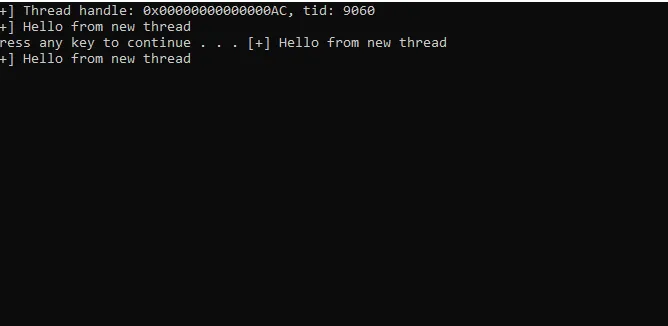
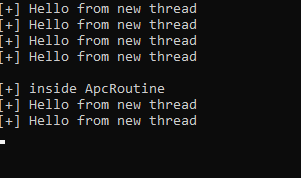
Once we press “enter” , QueueApc routine function will be executed
Placing the breakpoint
Now we have a program that queueing APC function, it’s time to place breakpoint and see what’s happening under the hood
In my setup, i placed breakpoint at NtQueueApcThreadEx2 ( I still don’t know why my breakpoint at NtQueueApcThread didn’t hit xD, so if you know, please let me know xD )
1 | kd> bp nt!NtQueueApcThreadEx2 |
After placing the breakpoint, hit “Enter” again to let the program jumps to ApcRoutine function.
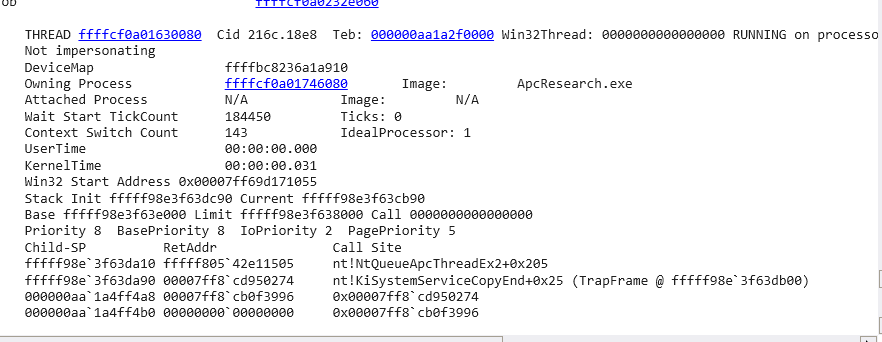
When the breakpoint hit, we need to verify if it was us triggering it, you can do this by typing !thread in Windbg to see of Image name match our program’s name.

My program’s name is: ApcResearch.exe which match in !thread Image
Now, there are a lot going on in nt!NtQueueApcThread , we don’t have to go through every line of assembly, we want to get to the function call that transition us to Kernel mode ntkrnlmp!KeInitializeApc (fffff80542d41e70)
Keep hitting “p” or step over until you get here.
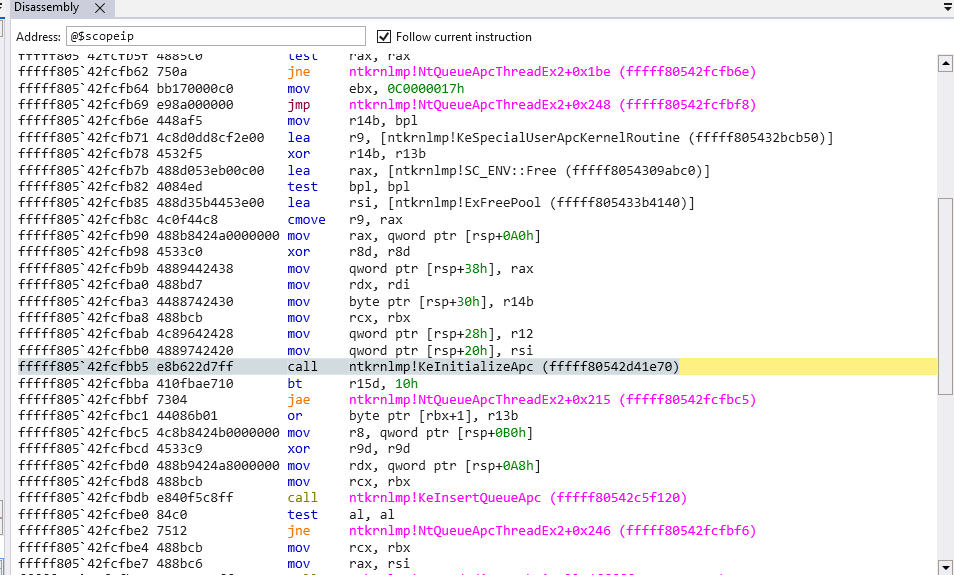
KeInitializeApc
Knowing function signature is important to understand the logic of it and its flow, I take the KeInitializeApc function’s logic and params from here ( which is a good resource to look into Windows kernel code logic )
1 | NTKERNELAPI |
In this function, we pay attention to the first 2 params: Apc and Thread , which will be the Apc func and our Thread, we can extract these values out of registers in Windbg ( in x64 calling conventions, first 4 params will always be in these registers RCX, RDX, R8 and R9 )
In Windbg:
1 | r @rcx |

So here we will have Apc=ffffcf0a02f18f80 and Thread=ffffcf0a0282a080 , we will examine the Thread first by typing:
1 | dt _KTHREAD ffffcf0a0282a080 |

the _KTHREAD structure is quite huge, I will focus on 4 fields that I think it useful for this blog post ( Alertable, ApcQueueable, Running, Process ), but feel free to examine it and explore it yourself.
I will briefly explain those fields and its meaning:
Running: 0⇒ not yet runningAlertable: 0x1⇒ Thread is in alertable state, which is a crucial part for APC executionApcQueueable: 0x1⇒ can be APC queued
We can verify again that it’s coming from our process:
1 | !process 0xffffcf0a`0174608 |
That’s for the _KTHREAD structure, now let’s look at _KAPC structure
1 | dt _KAPC ffffcf0a02f18f80 |
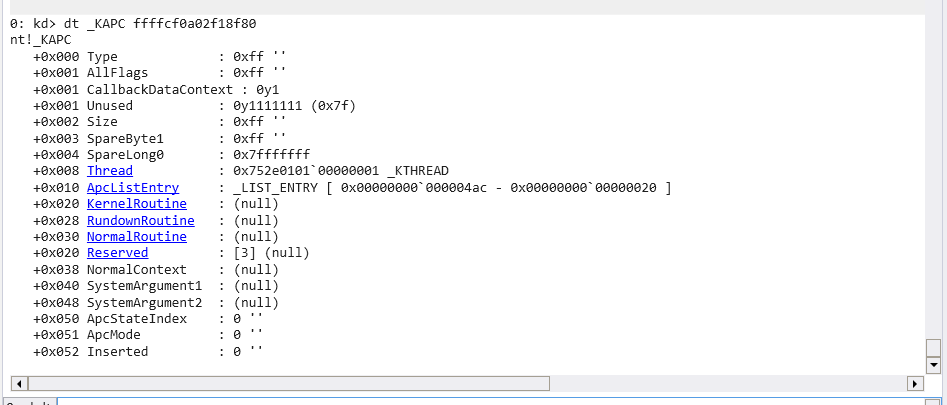
The fields we going to pay attention to are:
- Type
- Thread:
- ApcMode
- SystemArgument1 and SystemArgument2
- Inserted
Now, press “p” or step over in Windbg to move past the call to nt!KeInitializeApc , display type _KAPC again and observe how the type values has changed:
1 | dt _KAPC ffffcf0a02f18f80 |
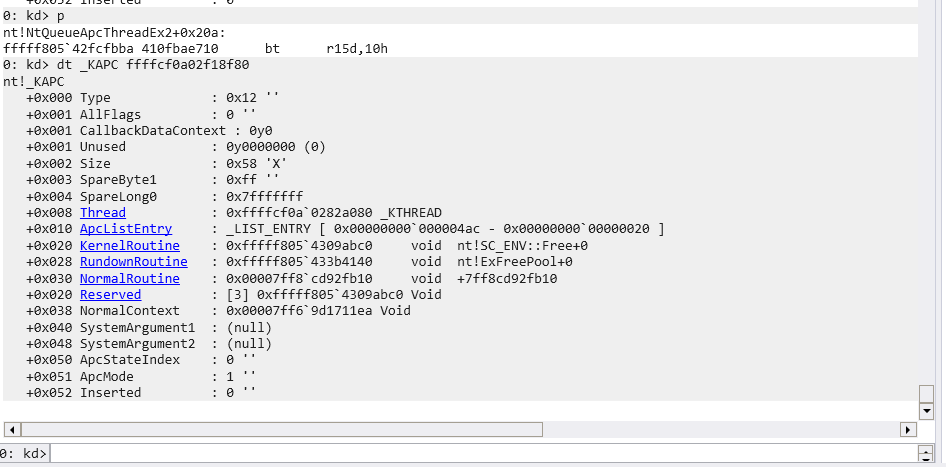
Noticeable changes:
Type: 0x12Thread: now the thread value is our_KTHREADfrom above (ffffcf0a0282a080). This would be the thread where APC going to queueApcMode: 1 ⇒ User modeSystemArgument1/2: We didnot pass any arguments so it’s nullInserted: 0 ⇒ this is the field indicate if the Apc is added to the list yet, that would lead to another function we need to explore:KeInsertQueueApc
To wrap up till now, we have:
- The journey of
QueueUserApcfrom user-mode to kernel-mode - Kernel debugging setup
KeInitializeApcfunction- Examination of
_KTHREADand_KAPCstructures
I will save KeInsertQueueApc for part 2, we will see how Inserted field changes in _KAPC . I hope this little intro gave you something informative and I hope you enjoy the read.
Happy hacking everyone !.